chdir "Z:/my\ Document/maya/projects/default/images"; // Windows の場合
for($i = 100; $i >= 1; $i--)
{
$old = "test.iff." + $i;
$new = "test.iff." + ($i + 30);
sysFile -rename $new $old;
}
if(! `pluginInfo -q -l "test.so"`)
loadPlugin "test.so";
string $s;
int $fpid = `fopen "Z:/mel/tmp.mel" "r"`;
for( $s = `fgetline $fpid`; size($s) > 0; $s = `fgetline $fpid`)
{
$s = `fgetline $fpid`;
print $s;
}
fclose $fpid;
int $fpid = `fopen "Z:/mel/tmp.mel" "w"`;
fwrite $fpid "sphere;\n";
fclose $fpid;
{
string $fname[] = `file -q -list`;
string $dirname = `dirname $fname[0]`;
string $newfile = `basename $fname[0] ".mb"`;
$newfile = `basename $newfile ".ma"`;
$newfile = $dirname + "/" + $newfile + "_v5.ma";
system("sed '4,11s/6\\.0/5.0/' <" + $fname[0] + ">"+ $newfile);
}
元のシーンファイル名が scene1.mb だとすると、
scene1_v5.ma という 5.0 のシーンファイルが作られる。
{
string $sel[] = `ls -sl`;
string $sl[] = `listRelatives -c $sel[1]`;
parent -s -add $sl $sel[0];
delete $sel[1];
}
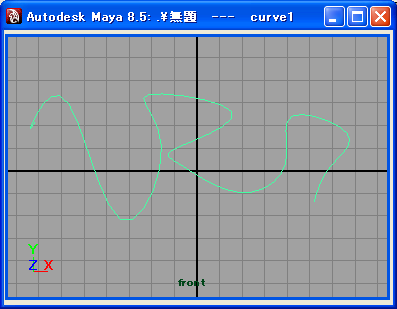
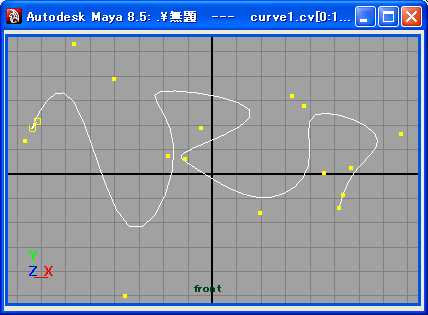
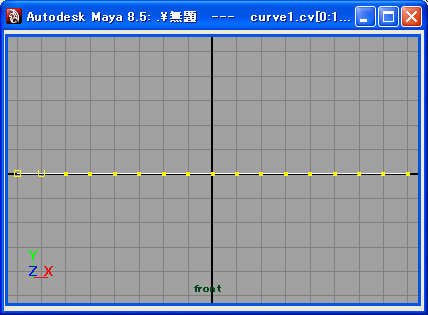
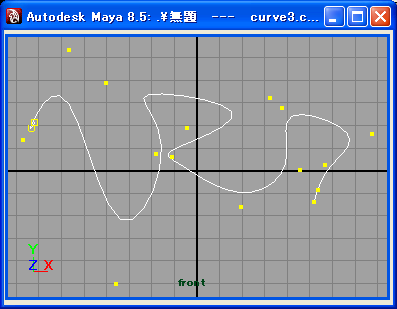
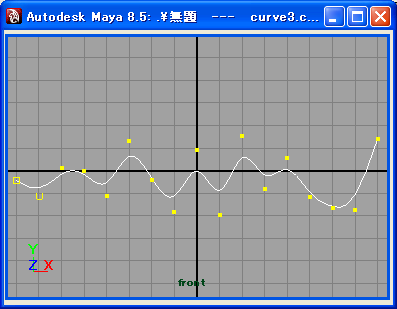
スクリプト実行前
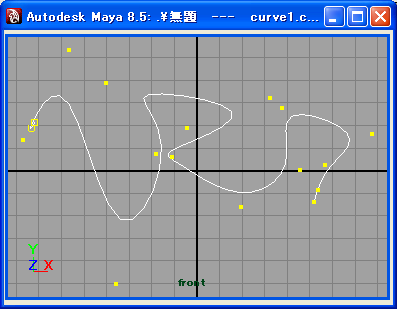
(curve1, curve2 の順に選択)
{
string $lname[] = `spaceLocator -p 0 0 0`;
string $sname[] = `sphere`;
move 1 2 3;
string $sph[] = `listRelatives -s $sname[0]`;
$cpm = `createNode closestPointOnSurface`;
connectAttr ($sph[0] + ".ws") ($cpm + ".is");
connectAttr ($lname[0] + ".t") ($cpm + ".ip");
float $p[] = `getAttr ($cpm + ".p")`;
move $p[0] $p[1] $p[2] $lname[0];
}
closestPointOnSurface ノードは点に最も近い UV 座標も求めることができる。
(parametarU, parametarV アトリビュート)
MAYA_SCRIPT_PATH = /home/ad000000/mel
MAYA_SCRIPT_PATH = c:\ad000000\mel
string $name[];
string $path = "aaa|bbb|ccc";
tokenize($path, "|", $name);
int $size = size($name);
$size--;
// $name[$size] に ccc が入っている。
if(`getAttr nurbsSphere1.v`)
{
print "not hidden\n";
}
else
{
print "hidden\n";
}
{
float $p1[] = `xform -q -ws -t joint1`;
float $p2[] = `xform -q -ws -t joint2`;
string $dname = `distanceDimension -sp $p1[0] $p1[1] $p1[2] -ep $p2[0] $p2[0] $p2[0]`;
print `getAttr ($dname + ".dist")`;
}
global proc variableExist(string $n)
{
string $names[] = `env`;
int $mc = stringArrayCount($n, $names);
if($mc > 0)
{
print "exists\n";
}
else
{
print "not exists\n";
}
}
上のプロシージャを使用する場合は、
変数名に $ を付けて引数として与える。
// トップセクション(トランスフォームノード)で選択されているアトリビュート channelBox -q -sma mainChannelBox; // Shapes のセクションで選択されているアトリビュート channelBox -q -ssa mainChannelBox; // Inputs のセクションで選択されているアトリビュート channelBox -q -sha mainChannelBox; // Outputs のセクションで選択されているアトリビュート channelBox -q -soa mainChannelBox;
selectKey -time ":";
float $allKeys[] = sort(`keyframe -q -sl`);
playbackOptions -min $allKeys[0] -max $allKeys[(size($allKeys) -1)];
{
string $names[] = `ls -tr`;
for($n in $names)
{
float $tx = `getAttr ($n + ".tx")`;
float $ty = `getAttr ($n + ".ty")`;
float $tz = `getAttr ($n + ".tz")`;
if($tx > 10)
{
print ("tx " + $n + " " + $tx + "\n");
}
if($ty > 10)
{
print ("ty " + $n + " " + $ty + "\n");
}
if($tz > 10)
{
print ("tz " + $n + " " + $tz + "\n");
}
}
}
{
string $dir = "/home/user/mel/";
string $winName = `window`;
string $form = `formLayout`;
string $i1 = `iconTextButton -w 33 -h 33 -style "iconOnly" -image1 "sphere.xpm"`;
string $pic1 = `picture -image ($dir + "picButton1.xpm")`;
formLayout -edit
-attachForm $pic1 "top" 0
-attachForm $pic1 "left" 0
-attachNone $pic1 "bottom"
-attachNone $pic1 "right"
-attachForm $i1 "top" 50
-attachForm $i1 "left" 50
-attachNone $i1 "bottom"
-attachNone $i1 "right"
$form;
setParent ..;
showWindow;
}
global proc changeMinValue()
{
float $value = `floatField -q -value myMinField`;
floatField -e -min $value myInputField;
}
global proc changeMinValueByButton()
{
float $value = `floatField -q -value myInputField`;
floatField -e -v $value myMinField;
floatField -e -min $value myInputField;
}
window;
rowLayout -nc 3 -cw3 60 30 60;
floatField -cc "changeMinValue();" myMinField;
button -label " < " -c "changeMinValueByButton();";
floatField -min 0 myInputField;
showWindow;
スクリプトの実行結果
{
int $i;
window;
columnLayout;
string $colorPalette = `palettePort
-dimensions 16 2
-width (16 * 20)
-height (2 * 20)
-transparent 0
-topDown true
-colorEditable false`;
for($i = 1; $i <= 31; $i++)
{
float $col[] = `colorIndex -query $i`;
palettePort -edit -rgbValue $i $col[0] $col[1] $col[2] $colorPalette;
}
showWindow;
}
global proc makeButton1(string $dragControl, string $dropControl, string $msgs[], int $x, int $y, int $type)
{
string $com = $msgs[0];
setParent dropLayout;
eval($com);
setParent ..;
}
global proc string[] dragButton1(string $dragControl, int $x, int $y, int $mods)
{
string $msgs[];
$msgs[0] = "button";
return $msgs;
}
window;
columnLayout -dpc "makeButton1" dropLayout;
setParent ..;
showWindow;
window;
columnLayout;
button -dgc "dragButton1";
setParent ..;
showWindow;
window myWindow;
columnLayout myLayout;
button myButton;
showWindow;
objectTypeUI myWindow;
// Result: floatingWindow //
objectTypeUI myLayout;
// Result: columnLayout //
objectTypeUI myButton;
// Result: button //
window;
// Result: window1 //
columnLayout;
// Result: window1|columnLayout1 //
button;
// Result: window1|columnLayout1|button1 //
showWindow;
layout -q -childArray window1|columnLayout1;
// Result: button1 //
window;
// Result: window1 //
columnLayout;
// Result: window1|columnLayout2 //
showWindow;
layout -q -ex window1|columnLayout2;
// Result: 1 //
deleteUI window1;
layout -q -ex window1|columnLayout2;
// Result: 0 //
global proc float displayCurrentFrame()
{
float $frame;
$frame = `currentTime -q`;
return $frame;
}
headsUpDisplay -section 5
-block 1
-blockSize "medium"
-label "Frame"
-command "displayCurrentFrame()"
-event "timeChanged"
HUDDisplayCurrentFrame;
global proc float [] getSelectedPosition()
{
float $val[];
string $sp[] = `ls -sl`;
string $pos[] = `filterExpand -sm 31 $sp`;
int $i = 0;
for($p in $pos)
{
$pv = `pointPosition $p`;
$val[$i] = $pv[0];
$i++;
$val[$i] = $pv[1];
$i++;
$val[$i] = $pv[2];
$i++;
}
return $val;
}
プロシージャーを実行すると、
X, Y, Z の座標値が選択された頂点の個数分返ってくる。
string $poly[] = `polySphere -sx 7 -sy 7 -r 3`;
string $ver[] = `polyListComponentConversion -toFace $poly[0]`;
string $verE[] = `filterExpand -selectionMask 34 $ver`;
for($obj in $verE)
{
string $pe[] = `polyExtrudeFacet $obj`;
string $ns[] = `polyInfo -fn $obj`;
string $vs[];
tokenizeList($ns[0], $vs);
float $vx = $vs[2];
float $vy = $vs[3];
float $vz = $vs[4];
move -r $vx $vy $vz $obj;
}
global proc find3Polygon1()
{
string $poly[] = `ls -sl`;
string $edge[] = `polyListComponentConversion -toFace $poly[0]`;
string $edges[] = `filterExpand -selectionMask 34 $edge[0]`;
for($obj in $edges)
{
string $list[];
string $num[] = `polyInfo -fe $obj`;
tokenizeList($num[0], $list);
if(size($list) == 5)
{
print ("find " + $obj + "\n");
}
}
}
4 角以上のポリゴンを見つけて、セレクトし、 SplitPolygonTool のモードに入るスクリプト。
global proc findNPolygon1()
{
string $poly[] = `ls -sl`;
select -cl;
string $edge[] = `polyListComponentConversion -toFace $poly[0]`;
string $edges[] = `filterExpand -selectionMask 34 $edge[0]`;
for($obj in $edges)
{
string $list[];
string $num[] = `polyInfo -fe $obj`;
tokenizeList($num[0], $list);
if(size($list) > 6)
{
select $obj;
fitPanel -selected;
SplitPolygonTool;
return;
}
}
}
global proc float [] getSelectedUVs()
{
float $uvs[];
string $sp[] = `ls -sl`;
string $ver[] = `polyListComponentConversion -toUV $sp[0]`;
string $pos[] = `filterExpand -sm 35 $ver`;
for($i = 0, $j = 0; $i < size($pos); $i++)
{
float $uv[];
$uv = (`polyEditUV -q $pos[$i]`);
$uvs[$j] = $uv[0];
$j++;
$uvs[$j] = $uv[1];
$j++;
}
return $uvs;
}
global proc string [] getFaceUVs1()
{
string $face[] = `ls -sl`;
string $uvc[] = `polyListComponentConversion -toUV $face[0]`;
string $map[] = `filterExpand -sm 35 $uvc`;
for($i = 0; $i < size($map); $i++)
{
$map[$i] = `substitute ".*\.map\\[" $map[$i] ""`;
$map[$i] = `substitute "]" $map[$i] ""`;
}
return $map;
}
global proc separatePolygon(string $pname)
{
polyChipOff -ch 1 -kft 0 -dup 0 ($pname + ".f[*]");
string $fs[] = `polySeparate -ch 1 $pname`;
string $gname[] = `gravity`;
for($f in $fs)
{
if(`nodeType $f` != "transform")
{
continue;
}
string $sf[] = `listRelatives -s $f`;
select $sf[0];
rigidBody -active;
}
connectDynamic -f $gname[0] $fs;
}
{
string $pname[] = `ls -sl`;
ctxCompletion;
int $size[] = `polyEvaluate -e $pname[0]`;
$size[0] -= 1;
select ($pname[0] + ".e[" + $size[0] + "]");
}
{
string $pname[] = `ls -sl`;
ctxCompletion;
string $psname[] = `listRelatives -s $pname[0]`;
string $polySplit[] = `listConnections ($psname[0] + ".inMesh")`;
float $ver[] = `getAttr ($polySplit[0] + ".v[*]")`;
int $size = `size $ver`;
$size = $size / 3 - 1;
int $msize[] = `polyEvaluate -uv $pname[0]`;
$msize[0] -= 1;
$size = $msize[0] - $size;
if($size >= 0)
untangleUV -pu true -r harmonic ($pname[0] + ".map[" + $size + ":" + $msize[0] + " ]");
setToolTo polySplitContext;
}
$winName = `window`;
string $form = `formLayout`;
$b1 = `button -label "button"`;
formLayout -edit
-attachForm $b1 "top" 0
-attachForm $b1 "bottom" 0
-attachOppositeForm $b1 "left" -100
-attachForm $b1 "right" 10
$form;
showWindow;
{
int $sections = 16;
int $spans = 8;
string $sphere[] = `sphere -s $sections -nsp $spans`;
$spans += 3;
int $num = $sections * $spans;
for($i = 0; $i < $num; $i++)
{
float $x = rand(-0.2, 0.2);
float $y = rand(-0.2, 0.2);
float $z = rand(-0.2, 0.2);
move -r $x $y $z ($sphere[0] + ".cv[" + $i + "]");
}
}
{
int $num = 10;
float $rad = 2;
string $cname = `curve -d 3 -p 0 0 0 -p 0 5.0 0 -p 0 5.0 0 -p 0 10 0 -k 0 -k 0 -k 0 -k 1 -k 1 -k 1`;
rebuildCurve -s (4*$num) $cname;
string $tname[] = `nonLinear -type twist $cname`;
move $rad 0 0 $cname;
setAttr ($tname[0] + ".endAngle") (360*$num);
}
string $sname1[] = `sphere`;
move 2 0 0;
string $sname2[] = `sphere`;
freeFormFillet -bias 0.0 -depth 0.5 ($sname1[0] + ".u[1.0]") ($sname2[0] + ".u[3.0]");
{
string $sname[] = `sphere`;
string $cname = `curve -d 3 -p -0 -0 0 -p 2 2 0 -p 4 6 0 -p 6 4 0 -k 0 -k 0 -k 0 -k 1 -k 1 -k 1`;
pathAnimation -c $cname -stu 1 -etu 100 $sname[0];
choice -at tx -at tz -t 1 -t 30 -t 60 $sname[0];
choice -at tx -at tz -t 31 $sname[0];
currentTime 31;
setKeyframe -at tx -at tz $sname[0];
move -r 3 0 5;
currentTime 59;
setKeyframe -at tx -at tz $sname[0];
}
以下のスクリプトでは、
NURBS の球が 1 フレームから 30 フレームまではキーフレーム、
31 フレームから 60 フレームまでは pointConstraint によって Cone と同じ位置でアニメーションし、
61 フレームからは再びキーフレームによってアニメーションを行う。
{
string $cname[] = `cone`;
currentTime 1;
setKeyframe;
currentTime 100;
move 5 0 5;
setKeyframe;
string $sname[] = `sphere`;
currentTime 1;
setKeyframe;
currentTime 100;
move -5 0 5;
setKeyframe;
choice -at tx -at tz -t 1 -t 30 -t 60 $sname[0];
string $chname[] = `choice -at tx -at tz -t 31 $sname[0]`;
pointConstraint $cname[0] $sname[0];
select -r pairBlend1;
delete;
print $chname;
connectAttr nurbsSphere1_pointConstraint1.ctx $chname[0];
connectAttr nurbsSphere1_pointConstraint1.ctz $chname[1];
}
{
string $sname[] = `sphere`;
currentTime 1;
setKeyframe -at tx;
currentTime 30;
move 10 0 0;
setKeyframe -at tx;
string $rname = `rigidBody -passive $sname[0]`;
currentTime 1;
setRigidKeyframe(0);
currentTime 31;
setRigidKeyframe(1);
string $gname[] = `gravity`;
connectDynamic -fields $gname[0] $rname;
}
addAttr -ln driven1 -min 0.0 -max 1.0 joint1;
setAttr joint1.driven1 0.0;
setAttr joint1.tx 5.0;
setDrivenKeyframe -cd joint1.driven1 joint1.translateX;
setAttr joint1.driven1 1.0;
setAttr joint1.tx 10.0;
setDrivenKeyframe -cd joint1.driven1 joint1.translateX;
joint -n joint1;
joint -p 5 0 0 -n joint2;
joint -p 10 0.5 0 -n joint3;
ikHandle;
cylinder -radius 1.0 -heightRatio 10.0 -sections 20 -spans 6 -n nurbsCylinderShape1;
move 4 0 0;
skinCluster -n skinCluster1 joint1 joint2 joint3 nurbsCylinderShape1;
このオブジェクト(nurbsCylinderShape1)から各 CV のウエイト値を求めるには
以下のコマンドを使用する。
{
string $dir = `workspace -q -rd`;
playblast -format image -viewer 0 -percent 50 -f ($dir + "images/persp");
}
各フラグの意味は以下の通り。
{
$ct = `currentTime -q`;
if($ct >= 30)
{
nurbsCone1.tx = `getAttr -t ($ct - 30) nurbsSphere1.tx
`;
}
else
{
nurbsCone1.tx = `getAttr -t 1 nurbsSphere1.tx`;
}
}
if(particleShape1.particleId % 100 == 0)
{
vector $p = particleShape1.position;
sphere -p ($p.x) ($p.y) ($p.z);
}
global proc myEventProc(string $particleName, int $particleID, string $objectName)
{
if($objectName == " pPlaneShape2")
{
particle -e -attribute lifespanPP -id $particleID -floatValue 0.0 $particleName;
}
}
この例では、pPlaneShape2 に衝突したときにパーティクルが消滅する。
if(rigidBody1.contactCount > 0)
{
string $pp[] = `rigidBody -q -cp rigidBody1`;
string $pos[];
tokenize $pp[0] $pos;
particle -p $pos[0] $pos[1] $pos[2];
string $emi[] = `emitter`;
particle;
connectDynamic -em $emi[0];
}
ここには記述していないがエミッターから発生するパーティクルには適当にアトリビュートを設定すること。
global proc shapedParticle1()
{
string $selected[] = `ls -sl`;
select -clear;
string $ename[] = `emitter -rate 300`;
string $pname[] = `particle`;
connectDynamic -emitters $ename[0];
for($sl in $selected)
{
collision $sl $pname[0];
connectDynamic -collisions $sl $pname[0];
}
int $max = `playbackOptions -q -max`;
string $loop = `playbackOptions -q -loop`;
playbackOptions -max 120 -loop once;
currentTime -e `playbackOptions -q -min`;
play -wait -state on;
disconnectAttr time1.outTime ($pname[1] + ".currentTime");
disconnectAttr time1.outTime ($ename[0] + ".currentTime");
string $gname[] = `listConnections particleShape1.collisionGeometry[0]`;
disconnectAttr time1.outTime ($gname[0] + ".currentTime");
currentTime -e `playbackOptions -q -min`;
playbackOptions -max $max -loop $loop;
}
(その他の例)
{
string $names[] = `ls -sl -type "file"`;
if(`size($names)` > 0)
{
string $texname = `getAttr ($names[0] + ".fileTextureName")`;
PaintEffectsWindow;
dynPaintOpenFile $texname "image";
}
}
{
string $names[] = `ls -sl`;
for($i = 1; $i < size($names); $i++)
{
string $bn = $names[$i];
string $cs = `createNode scaleConstraint`;
connectAttr -f ($names[0] + ".scale") ($cs + ".target[0].targetScale");
connectAttr -f ($names[0] + ".parentMatrix[0]") ($cs + ".target[0].targetParentMatrix");
float $os = `getAttr ($names[0] + ".scaleX")`;
string $stroke[] = `listRelatives $bn`;
string $brush[] = `listConnections -t brush $stroke[0]`;
float $ts = `getAttr ($brush[0] + ".globalScale")`;
float $rate = $ts/$os;
setAttr ($cs + ".offsetX") $rate;
connectAttr -f ($cs + ".constraintScale.constraintScaleX") ($brush[0] + ".globalScale");
}
}
string $sname[] = `sphere`;
string $shname = `shadingNode -asShader blinn`;
string $sgname = `sets -renderable true -noSurfaceShader true -empty`;
connectAttr -f ($shname + ".outColor") ($sgname + ".surfaceShader");
select -r $sname[0];
sets -e -forceElement $sgname;
string $shname = `shadingNode -asShader lambert`;
string $tex = `shadingNode -asTexture checker`;
string $ptex = `shadingNode -asUtility place2dTexture`;
connectAttr ($ptex + ".outUV") ($tex + ".uv");
connectAttr ($ptex + ".outUvFilterSize") ($tex + ".uvFilterSize");
connectAttr -f ($tex + ".outColor") ($shname + ".color");
{
string $mname = "lambert1";
defaultNavigation -createNew -destination ($mname + ".color");
createRenderNode -allWithTexturesUp ("defaultNavigation -force true -connectToExisting -source %node -destination " + $mname + ".color") "";
defaultNavigation -defaultTraversal -destination ($mname + ".color");
window -e -vis true createRenderNodeWindow;
}
{
string $texfiles[] = `ls -type file`;
for($f in $texfiles)
{
AEfileTextureReloadCmd ($f + ".fileTextureName");
}
}
{
string $texfiles[] = `ls -type file`;
for($f in $texfiles)
{
AEpsdFileTextureReloadCmd ($f + ".fileTextureName");
}
}
{
$panel = `getPanel -withFocus`;
if(`getPanel -typeOf $panel` == "modelPanel")
modelEditor -e -dl "none" $panel;
}
{
$panel = `getPanel -withFocus`;
if(`getPanel -typeOf $panel` == "modelPanel")
modelEditor -e -wos (!`modelEditor -q -wos $panel`) $panel;
}
{
$panel = `getPanel -withFocus`;
if(`getPanel -typeOf $panel` == "modelPanel")
modelEditor -e -xray (!`modelEditor -q -xray $panel`) $panel;
}
{
$panel = `getPanel -withFocus`;
if(`getPanel -typeOf $panel` == "modelPanel")
isolateSelect -state (!`isolateSelect -q -state $panel`) $panel;
}
window;
paneLayout;
modelPanel;
showWindow;
colorEditor;
float $col[] = `colorEditor -q -rgb`;
print ("red " + $col[0] + "\n");
print ("green " + $col[1] + "\n");
print ("blue " + $col[2] + "\n");
window;
columnLayout -adjustableColumn true;
button; // button1
columnLayout;
button; // button2
setParent ..;
showWindow;
{
string $window = `window`;
string $form = `formLayout`;
string $b1 = `button`;
string $b2 = `button`;
formLayout -edit
-attachNone $b1 "top"
-attachForm $b1 "left" 0
-attachForm $b1 "bottom" 0
-attachPosition $b1 "right" 0 50
-attachNone $b2 "top"
-attachPosition $b2 "left" 0 50
-attachForm $b2 "bottom" 0
-attachForm $b2 "right" 0
$form;
showWindow $window;
}
window;
columnLayout;
button -annotation "sample button";
showWindow;
if(`getAttr persp.orthographic`)
{
print "Orthographic\n";
}
else
{
print "Perspective\n";
}
scriptCtx -title "my scale tool" -totalSelectionSets 1
-finalCommandScript "select -r $Selection1; scale 2 2 2;" myScaleTool;
setToolTo myScaleTool;
scriptCtx -title "merge Tool"
-totalSelectionSets 1
-setAutoComplete false
-setAutoToggleSelection true
-setSelectionCount 0
-vertex true
-expandSelectionList true
-finalCommandScript "int $size = size($Selection1);\
float $pos[] = `pointPosition $Selection1[$size-1]`;\
polyMergeVertex -d 10.0 $Selection1;\
move $pos[0] $pos[1] $pos[2];"
myMergeVertexContext;
setToolTo myMergeVertex; によってコンテキストモードに入り、
ポリゴンの頂点を順番に選択して Enter キーを押すと、
最後に選択された頂点の位置にマージされる。